Integrevise runs viva style oral assessments at scale. You enable it on an assignment, students complete a structured conversation through the platform, and a draft report is produced for you to review and release.
This article describes what the platform is for, the role AI plays in the workflow, and the layout of the teacher dashboard.
What Integrevise is for
A viva confirms understanding. The student cannot rely on a written deliverable alone; they have to explain the reasoning behind it in conversation. That difference is harder to fake and faster to read than a written submission alone.
Integrevise removes the practical constraints that usually limit the format. There is no scheduling per student, no need for a room, and the conversation, recording, and draft analysis are handled by the platform. Your role is to review the report, edit anything that does not reflect your reading of the session, and release the result.
The platform suits assessments where authorship and depth of understanding matter: capstones, projects, module orals, authenticity checks on substantial written work. It is less well suited to weekly low stakes submissions.
The role of AI
Conversations are conducted by Integrevise, with questions generated from your assignment brief and module context. The first question is generated from the brief; follow ups adapt to what the student says.
In practice this means:
- The conversation, recording, transcription, and a draft analysis are produced by the platform.
- The grading decision remains yours. The viva report is intended to help verify whether the student can clearly articulate their submission and the reasoning behind it.
- Rubric weighting is set by a scoring preset on each viva. The preset can be changed at any time.
- Attempt counts are set by configuration. Students can request additional attempts, which you approve or decline.
What the platform does and does not do
The platform can:
- Run a viva conversation grounded in your assignment brief.
- Record and transcribe the session.
- Draft a criterion scored analysis with reasoning, strengths, and improvement suggestions.
- Track cohort progress and surface flagged events.
- Retain attempts, incidents, and replays for later review.
The platform does not:
- Replace your academic judgement.
- Generate strong questions from a thin brief. The questions reflect what is in the brief; a generic brief produces generic questions.
- Adjudicate misconduct. Patterns are flagged for review; outcomes follow your institution's process.
- Override module policy. Release mode, attempt counts, and grade boundaries are configured by you.
The teacher dashboard
When you sign in, you’ll see your dashboard. Here, you can view your vivas, open your modules, and find help if you need it. The first time you sign in, you may also see a short welcome message and an optional tour.
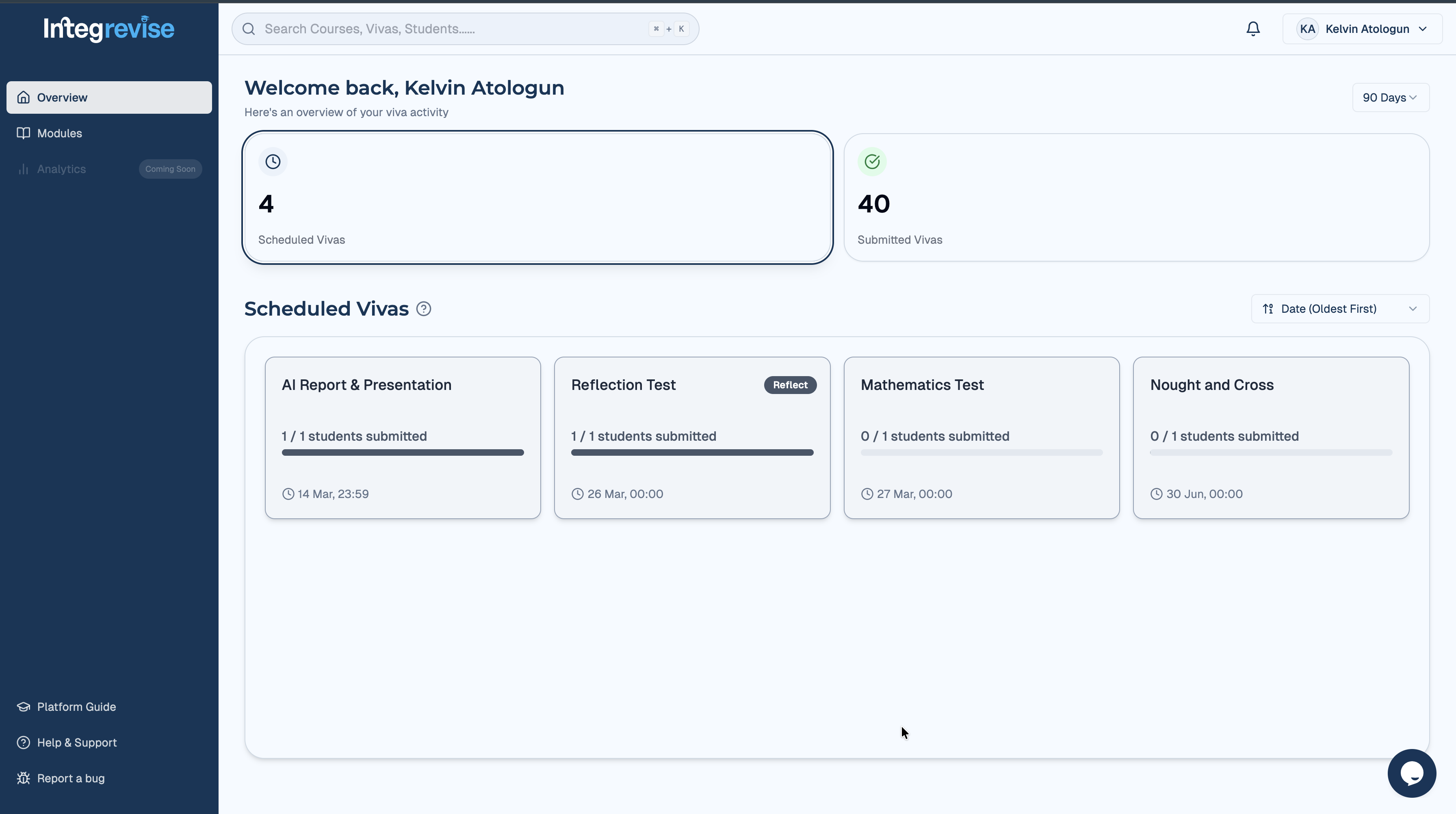
Global search
A global search dialog opens from the top bar and takes module names, module codes, or viva names as input. Selecting a result opens the corresponding page.
Where to start
For a new assignment, the Enabling Integrevise on an Assignment and Configuring Viva Settings articles cover the setup steps. For a cohort already underway, Monitoring Your Cohort and Reviewing Student Attempts describe the day to day workflow.